
Using Dhaedalida
How the protection works and how to drive it — from selecting a file and choosing functions to shipping a protected build, in the desktop app or from the command line.
Overview
Dhaedalida is a Windows software-protection tool for native 64-bit (x64) applications and libraries. It takes a compiled program — an .exe or a .dll — and produces a protected copy that is far harder to reverse-engineer, analyze, or tamper with, while running exactly like the original.
Dhaedalida belongs to the same family as protectors such as VMProtect and Themida, and it combines three cooperating layers of protection:
- Code virtualization — chosen functions are rewritten into a custom, per-function virtual machine. The original machine code is removed from the file, so the logic can no longer be read with a disassembler.
- The packer — the whole program is compressed and encrypted behind a self-unpacking loader, which also hides the imports and can add a suite of anti-analysis defenses (anti-debug, anti-VM, anti-tamper, and more).
- String encryption — text and other string literals used by protected functions are encrypted on disk and only decrypted, briefly, while the program runs.
Who it's for
- Software vendors who want to protect intellectual property, licensing logic, or algorithms in a shipped product.
- Developers who need to make a specific set of sensitive functions resistant to inspection.
How you use it
Dhaedalida ships as a simple desktop application:
- Select the
.exeor.dllyou want to protect. - Choose the functions to virtualize — either by ticking them in a list, or automatically via source-code markers you added while building.
- Pick your protection options (virtualization settings, and, in the Pro edition, the packer and its anti-analysis layers).
- Protect — Dhaedalida writes a new, protected copy of your program.
The rest of this documentation walks through each of these steps, explains how the protection works in plain terms, and describes the three editions. See Editions for the full comparison.
How the protection works
Dhaedalida protects a program with three cooperating layers. You don't need to understand the internals to use it, but knowing what each layer does helps you choose the right options.
1. Code virtualization
This is the core of Dhaedalida. For each function you choose to protect, Dhaedalida does not simply encrypt or hide the code — it rewrites the function into a custom virtual machine:
- The function's original entry point is redirected into a new, dedicated section of the file (named
.dhaeby default). - The original machine code is replaced — what's left in its place is anti-disassembly filler, so the real logic no longer exists anywhere in the file as normal x64 instructions.
- At run time, the protected function runs as a chain of small handlers that operate on a private, in-memory copy of the CPU's registers instead of on the real ones. The path from one handler to the next is computed on the fly, so a static disassembler can't follow the control flow.
In short: the protected function becomes an interpreter of itself. A tool like a disassembler or a decompiler no longer sees your original instructions — it sees a bespoke virtual machine whose structure is randomized on every build, so no two protected functions (and no two builds) look alike. Numeric constants used by the function are stored encrypted inside the blob and only decrypted at run time, so scanning the file for constants reveals nothing either.
Virtualization works on both .exe and .dll files, and the protected function behaves identically to the original from the caller's point of view.
2. The packer
The packer is a whole-file layer (available in the Pro edition). When enabled, it:
- Compresses and encrypts every section of your program — including the virtualization section — into a single payload.
- Redirects the program's start-up to a small, self-contained loader stub in a new section (
.bootp). - At launch, that stub decrypts and unpacks everything back into memory, rebuilds the program's imports, and then starts your program normally.
Because the original sections are compressed and encrypted on disk, the packed file is both smaller and far less revealing to static analysis tools. The packer can additionally hide the program's imports (so a memory dump shows no real API addresses) and bake in a range of anti-analysis defenses — see Packer & anti-analysis.
The packer's file-level protection supports both .exe and .dll; the optional anti-analysis layers are for executables.
3. String encryption
Programs often leak information through their text: error messages, URLs, key names, prompts. With string encryption enabled, Dhaedalida encrypts the string literals used by your protected functions so that they appear only as ciphertext in the file. Each string is decrypted on demand, inside the virtual machine, at the moment it's used, and lives in plaintext only briefly, in a private buffer. Running a tool like strings.exe on the protected file reveals no readable text for those literals.
Both regular and wide (Unicode) strings are supported. Strings that are also shared with unprotected parts of the program are detected and left untouched, so the rest of your program keeps working.
A note on expectations
Dhaedalida raises the cost and difficulty of reverse-engineering, tampering, and analysis very significantly — that is its purpose. Like all software protection, it is best understood as raising the bar, not as a guarantee of unbreakability. Layering virtualization, the packer, and string encryption together gives the strongest result.
Getting started
What's in the package
Each Dhaedalida edition ships as a single, ready-to-run folder containing:
Dhaedalida.exe— the graphical application you interact with.dhaedalida-cli.exe— the command-line engine that performs the actual protection. The GUI drives it for you; the two must sit in the same folder.- The Qt runtime and the Visual C++ runtime needed to run the app.
- The marker SDK (in a
sdk/sub-folder) for tagging functions in your source code. - A README and third-party notices.
Just unzip the folder and run Dhaedalida.exe — there is nothing to install.
Licensing
The Basic and Pro editions require a valid license file, lic.dhae, to run. Place it next to the executables (or in %APPDATA%\Dhaedalida) and start the application. If the license is missing or invalid, Dhaedalida shows a short message and exits.
The Demo edition needs no license — you can run it immediately to try basic virtualization.
You can review the active license at any time on the License page inside the app:
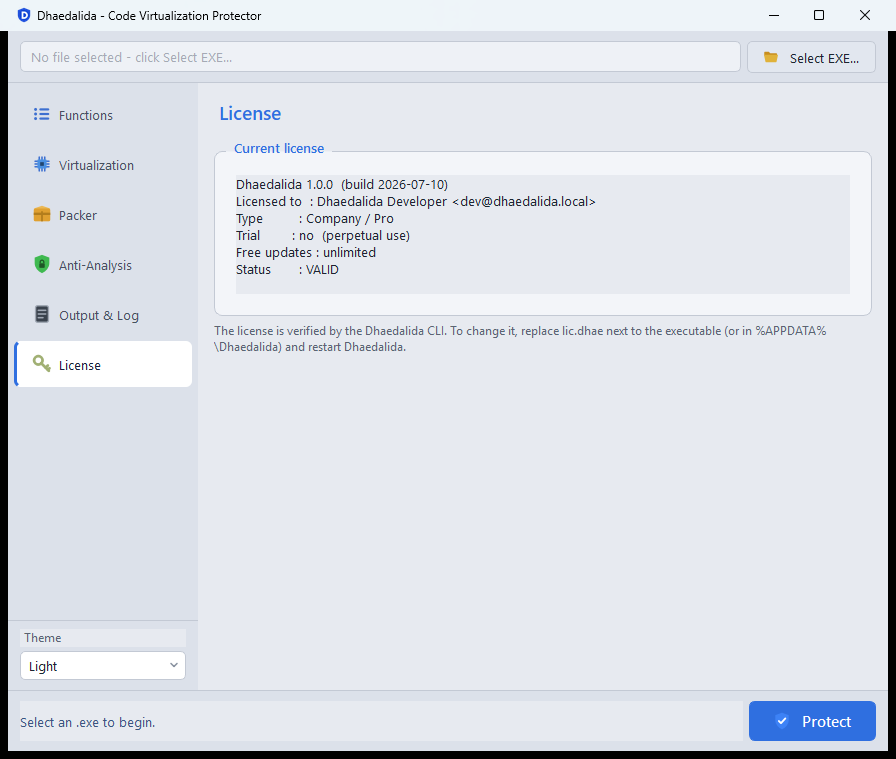
The License page shows the product edition, the license type, the free-updates window, and the current validity status. To change your license, replace lic.dhae and restart the application.
The main window
When you launch Dhaedalida you're presented with a single window:
- A file bar across the top, with the Select EXE… button.
- A sidebar on the left that switches between the sections: Functions, Virtualization, Packer, Anti-Analysis, Output & Log, and License.
- A theme selector (Light / Dark) at the bottom-left.
- The Protect button at the bottom-right, which runs the protection once you've made your choices.
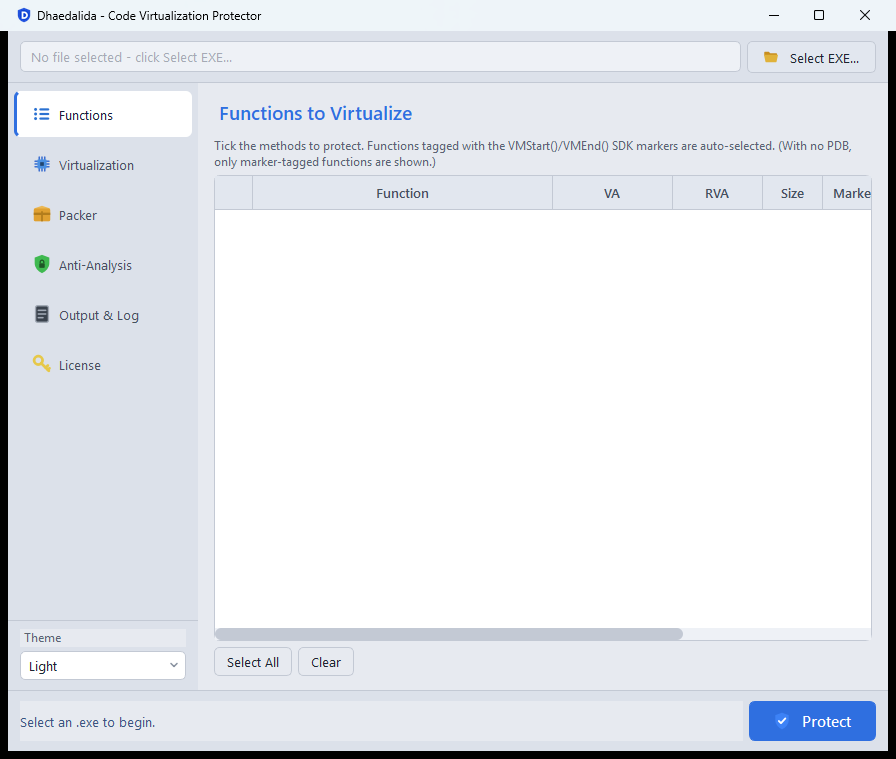
From here, the typical workflow is: Select a file → choose functions on the Functions page → set options on the Virtualization / Packer / Anti-Analysis pages → click Protect. The next sections cover each of these steps.
Running the protection
When you click Protect, Dhaedalida writes a new, protected copy of your program (by default named <yourprogram>.protected.exe) and reports progress in the Output & Log page:
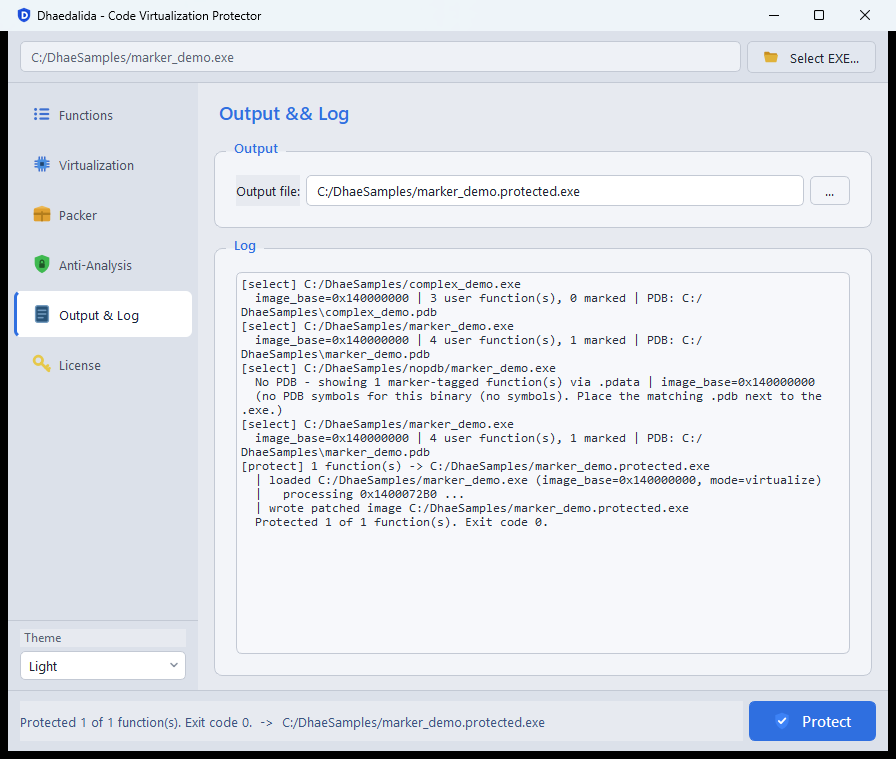
When it finishes, a summary dialog confirms how many functions were protected and where the output was written:
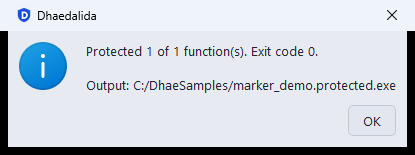
Your original file is never modified — the protected program is always written to a separate output file.
Selecting a file and choosing functions
Selecting the program
Click Select EXE… at the top of the window and pick the .exe or .dll you want to protect. Dhaedalida reads the file and lists its protectable functions on the Functions page.
The function list
The Functions page shows one row per function, with its name, virtual address (VA), relative address (RVA), size, and a Marker column. Tick the checkbox next to each function you want to virtualize.
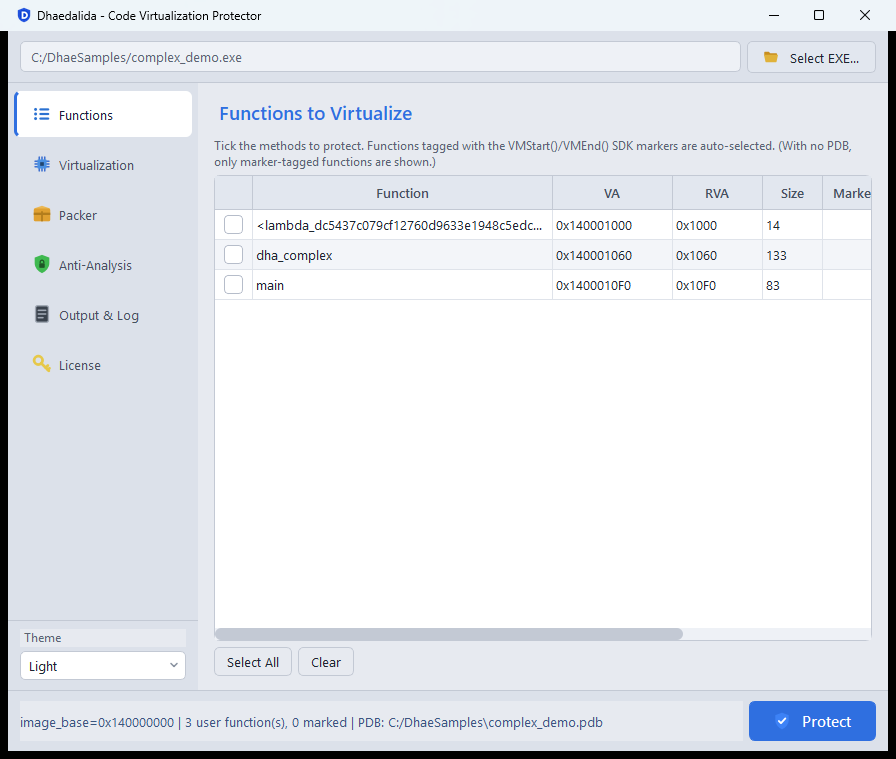
Two buttons below the list help with bulk selection:
- Select All — tick every function in the list.
- Clear — untick everything.
Dhaedalida finds the functions to list in one of two ways, depending on whether debug symbols are available.
With a PDB (debug symbols)
If a matching .pdb file sits next to your program, Dhaedalida uses it to list your functions by their real names and filters out runtime/library code, so you see just your functions. This is the easiest way to find and pick exactly the functions you care about. The status bar at the bottom confirms the symbol file that was loaded.
Without a PDB — source-code markers
You don't need a PDB. Dhaedalida can find functions you've explicitly tagged in your source code with the VMStart() / VMEnd() markers from the included SDK. Any function that contains these markers is detected automatically — with or without a PDB — and is auto-selected (pre-ticked) in the list. Marker-tagged functions show VM in the Marker column.
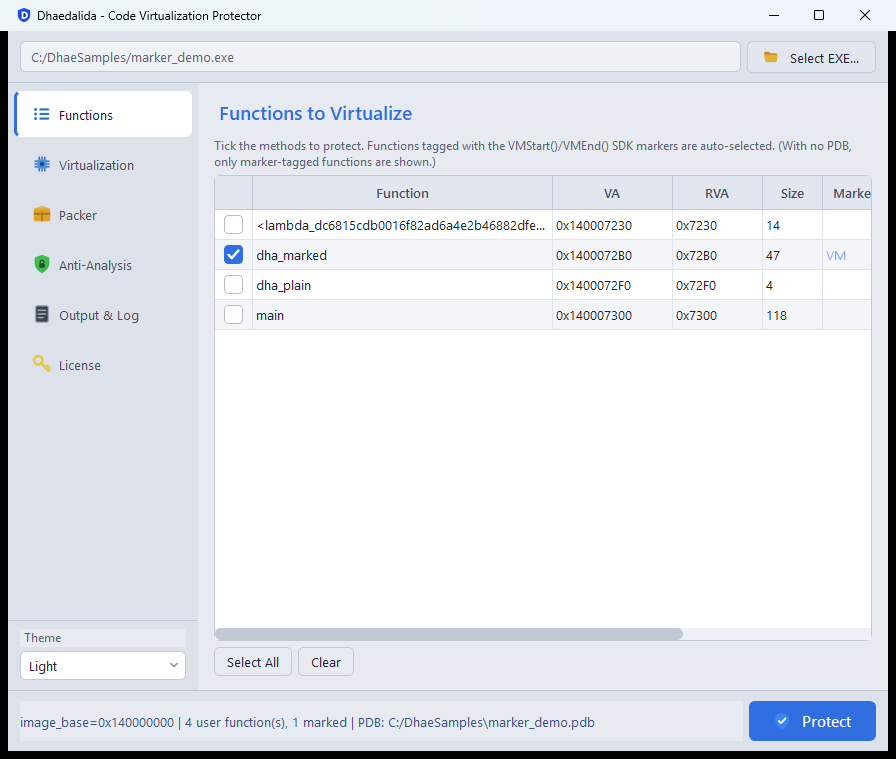
When no PDB is present, the list shows only the marker-tagged functions (identified by their address, e.g. sub_140001010), because without symbols there's no reliable way to tell your code apart from runtime code:
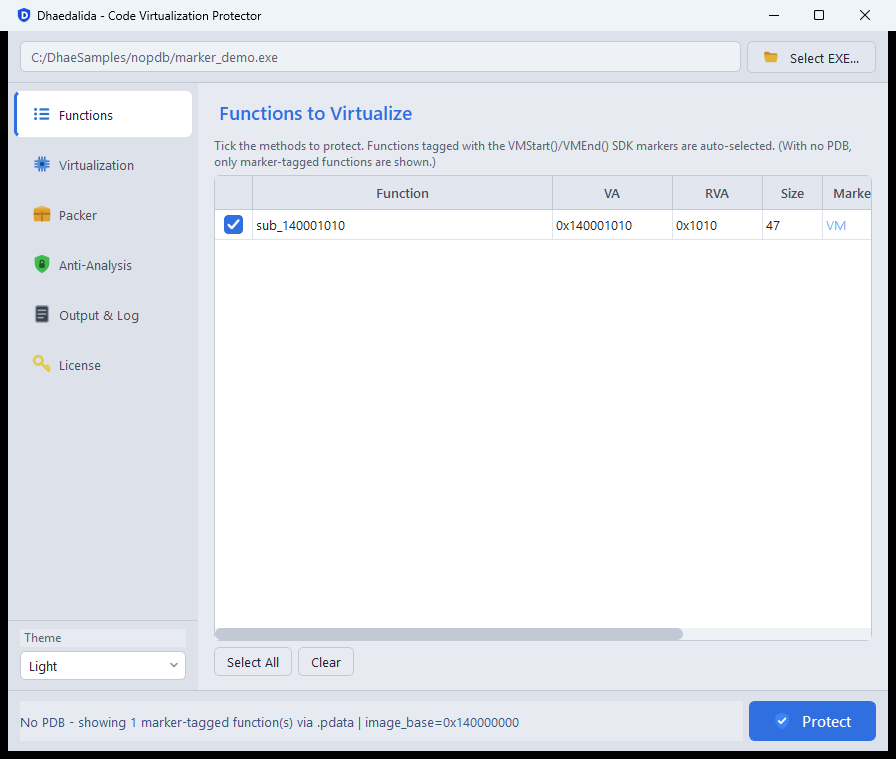
About the markers
The markers are a tiny SDK you add to your build. In your code you simply bracket a function's body:
#include "dhae_sdk.h"

int my_secret_function(int a, int b) {
    VMStart();
    // ... the logic you want protected ...
    VMEnd();
    return result;
}
Any function that uses the markers is selected for virtualization as a whole function (the markers tag the enclosing function; they don't carve out a sub-region). Because detection is based on a byte-level signature rather than symbol names, the markers are language-agnostic: ready-made bindings ship for C, C++, Rust, Go, Delphi/Object Pascal, D, Zig, Nim, and assembly (MASM/FASM/NASM) — any natively compiled x64 language works. (Managed .NET / Visual Basic is out of scope, since it isn't native x64 code.)
Markers make protection repeatable and self-documenting: mark the functions once in your source, and the right set is auto-selected every time you protect the build — no need to hunt for addresses.
The Entry Point option
If you also want to protect the program's start-up code, tick Entry Point virtualization on the Virtualization page. This adds the program's entry point to the set without you needing to find it in the list.
Virtualization options
The Virtualization page holds the settings that apply to the code-virtualization stage. These options are always available (they don't require the packer) and are found in every edition that supports full virtualization.
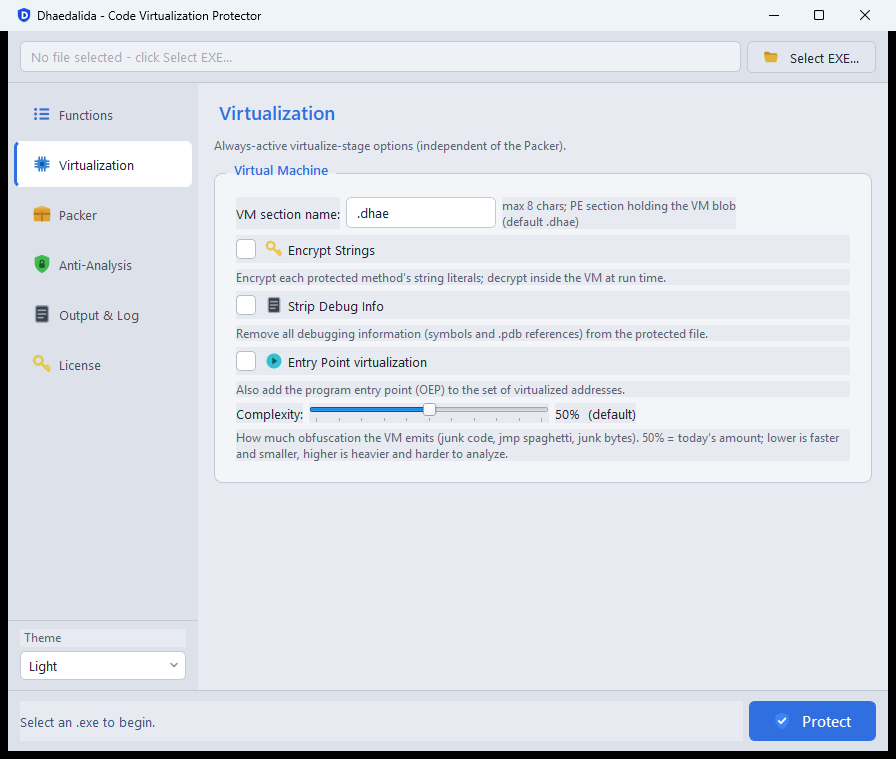
VM section name
Dhaedalida places the virtualized code in a new section of the file, named .dhae by default. You can change this name here (up to 8 characters) if you'd like the protection section to blend in with your program's own section names. Leaving it as .dhae is perfectly fine.
Encrypt Strings
Encrypts the string literals used by the protected functions, so no readable text for them remains in the file. Each string is decrypted only briefly, inside the virtual machine, at the moment it's used. See How the protection works for details. This is a good default for any program that contains sensitive text.
Strip Debug Info
Removes all debugging information from the protected file — the embedded debug-symbol path, the symbol table, and any debug sections. With this on, analysis tools get no symbol names or line numbers, and the file no longer reveals the path to your .pdb. Recommended for release builds.
Entry Point virtualization
Also virtualizes your program's entry point (its start-up code), in addition to the functions you ticked on the Functions page. This is a convenient way to protect start-up logic without locating the entry point yourself.
Complexity
A slider from 0 to 100 controlling how much obfuscation the virtual machine emits — junk code, jump "spaghetti", and filler bytes.
- 50 % is the default, balanced amount.
- Lower values produce smaller, faster protected code that is quicker to build.
- Higher values produce heavier, harder-to-analyze code at the cost of size and speed.
Adjust this based on how much you value maximum resistance versus size and performance for a given program. Once these are set, you can either click Protect (for virtualization only) or move on to the Packer and Anti-Analysis pages to wrap the whole program in the packer.
The packer & anti-analysis
The packer wraps your whole program in a self-unpacking, encrypted loader, and can bake in a suite of anti-analysis defenses. The packer and its layers are a Pro edition feature (see Pricing).
The packer can be used on its own, without virtualizing any function — a "pack-only" mode that simply compresses, encrypts, and protects an existing program. Or combine it with virtualization for the strongest result.
The Packer page
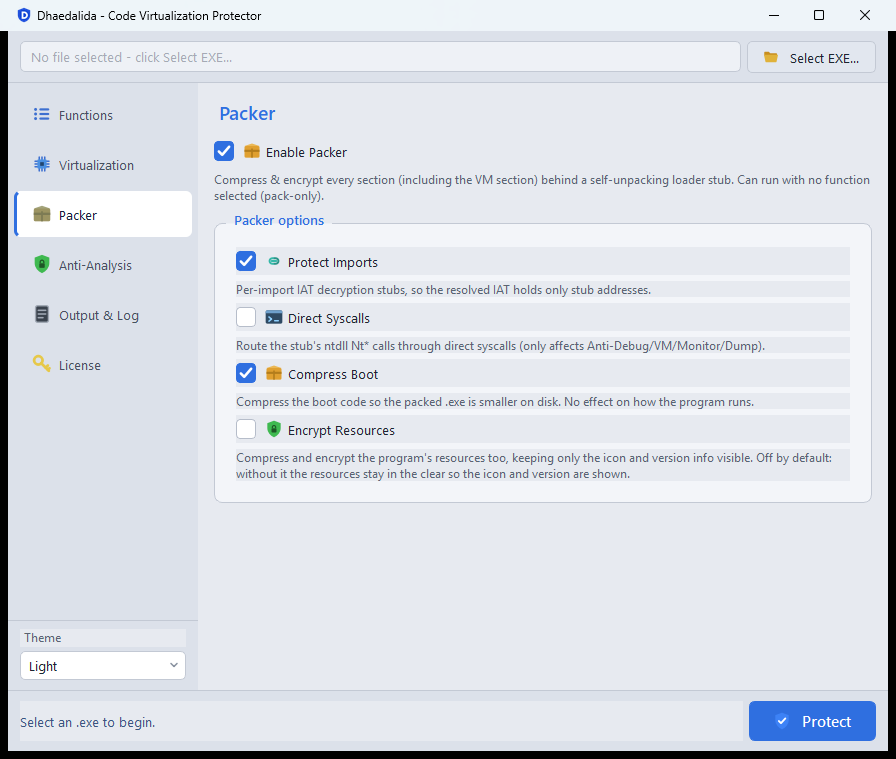
Enable Packer turns the whole stage on. When enabled, four options refine it:
| Option | What it does |
|---|---|
| Protect Imports | Hides the program's imports so a memory dump reveals no real API addresses; each call is decrypted only as it's used. |
| Direct Syscalls | Routes the loader's system calls through a lower-level path that is harder to intercept. (Only affects the anti-analysis features below.) |
| Compress Boot | Makes the packed file smaller on disk. No effect on how the program runs. |
| Encrypt Resources | Also compresses and encrypts the program's resources, keeping only the icon and version info visible. Off by default, so that Windows Explorer still shows your program's icon. |
The Anti-Analysis page
With the packer enabled, the Anti-Analysis page lets you add protection layers that are baked into the loader and activate when your program starts:
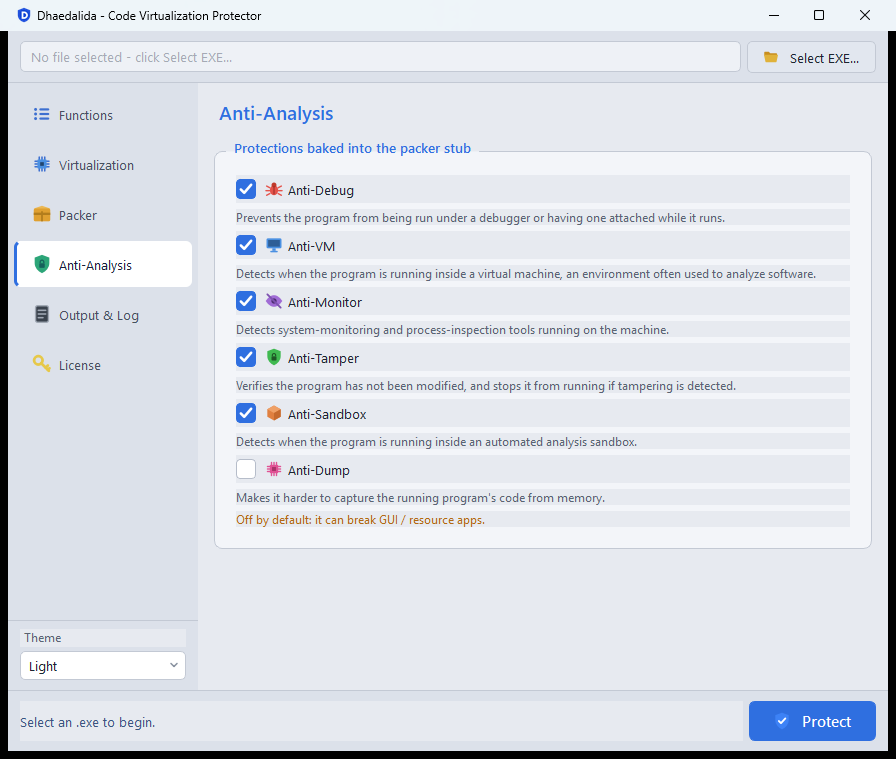
| Protection | What it does |
|---|---|
| Anti-Debug | Prevents the program from being run under a debugger or having one attached while it runs. |
| Anti-VM | Detects when the program is running inside a virtual machine — an environment often used to analyze software. |
| Anti-Monitor | Detects system-monitoring and process-inspection tools running on the machine. |
| Anti-Tamper | Verifies the program hasn't been modified, and stops it from running if tampering is detected. |
| Anti-Sandbox | Detects when the program is running inside an automated analysis sandbox. |
| Anti-Dump | Makes it harder to capture the running program's code from memory. Off by default — it can interfere with some GUI/resource applications. Test your program with it enabled before shipping. |
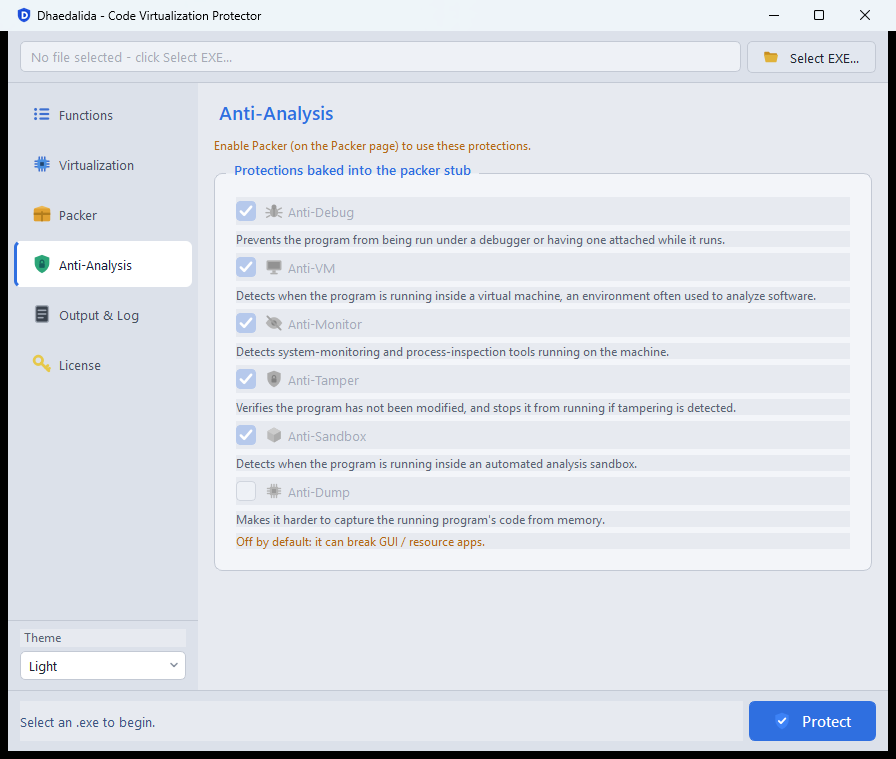
These options require the packer
The anti-analysis layers live inside the packer's loader, so they're only available when Enable Packer is on. If the packer is off, the page greys the options out and shows a reminder:
Choosing options
- For maximum protection, combine virtualization (of your key functions) with the packer, Protect Imports, Anti-Debug, Anti-Tamper, and Compress Boot.
- Anti-VM and Anti-Monitor are powerful but will stop your program from running in virtual machines or on machines with monitoring tools — appropriate for some products, disruptive for others. Choose them deliberately.
- Always test the protected program on a clean target machine after enabling anti-analysis layers, especially Anti-Dump.
Editions: Demo, Basic, and Pro
Dhaedalida comes in three editions. Each is a complete, ready-to-run package (GUI + engine + runtime); they differ in which protection features are available. For prices and licensing options, see the pricing page.
| Feature | Demo (free) | Basic | Pro |
|---|---|---|---|
| Code virtualization | Basic only | Full | Full |
| Obfuscation passes (junk code, spaghetti, …) | — | Full | Full |
| Complexity slider | — | ✓ | ✓ |
| Custom VM section name | — | ✓ | ✓ |
| String encryption | — | ✓ | ✓ |
| Strip debug info | ✓ | ✓ | ✓ |
| Packer (compress + encrypt whole file) | — | — | ✓ |
| Protect Imports | — | — | ✓ |
| Anti-Debug / Anti-VM / Anti-Monitor | — | — | ✓ |
| Anti-Tamper / Anti-Sandbox / Anti-Dump | — | — | ✓ |
| Compress Boot / Encrypt Resources | — | — | ✓ |
| Startup splash screen added to output | Yes | — | — |
| License required to run | No | Yes | Yes |
Demo (free)
The Demo edition is a free "try before you buy" build. It lets you experience code virtualization first-hand with no license required.
- It performs basic virtualization only — the additional obfuscation passes, string encryption, custom section naming, and the complexity control are reserved for the paid editions.
- The packer and all anti-analysis layers are not included.
- Every program you protect with the Demo gets a small, one-time start-up splash screen identifying it as produced by the Demo edition. Your program still runs normally; the splash simply appears briefly at launch.
Inside the app, the Demo edition is clearly marked with a banner, and the premium controls are visibly disabled so you can see what the paid editions unlock.
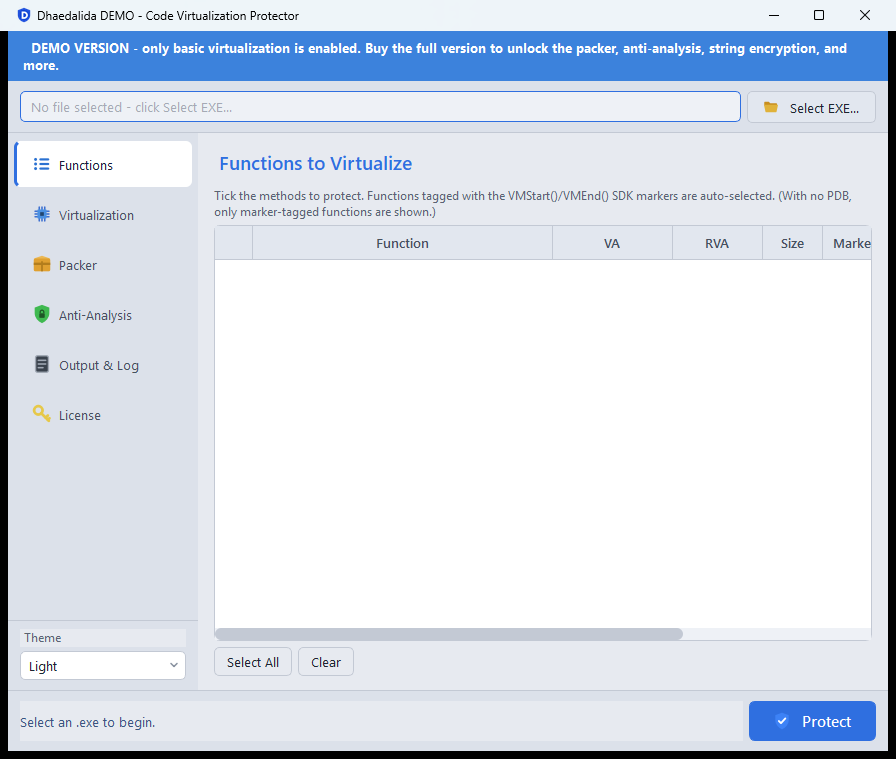
On the paid-only pages (Virtualization, Packer, Anti-Analysis) the premium options — string encryption, custom section naming, the complexity control, the packer, and every anti-analysis layer — are all greyed out in the Demo, so you can see exactly what an upgrade unlocks.
Basic
The Basic edition is the full virtualization product:
- Full code virtualization with the complete set of obfuscation passes — significantly stronger than the Demo.
- String encryption, custom section naming, the complexity control, and debug-info stripping.
- A real license is required to run.
Basic does not include the packer or the anti-analysis layers — those are Pro features. If you try to use a packer option, Basic will tell you it's available in Pro.
Pro
The Pro edition is the complete product. It includes everything in Basic, plus the entire packer stage and every anti-analysis layer:
- The packer (compress + encrypt the whole program behind a self-unpacking loader).
- Protect Imports, Anti-Debug, Anti-VM, Anti-Monitor, Anti-Tamper, Anti-Sandbox, Anti-Dump, Direct Syscalls, Compress Boot, and Encrypt Resources.
Pro is the right choice when you want to combine per-function virtualization with whole-file packing and active runtime defenses. A further Ultimate edition, adding an integrated licensing system, is planned — see Pricing.
How the app adapts to your edition
The GUI reads your edition from the license and adjusts automatically — enabling exactly the controls your edition supports and greying out the rest. The Demo edition additionally shows a banner and title marking it as the Demo build, so it's always clear which edition you're running.
Command-line reference
The graphical application drives a command-line engine, dhaedalida-cli.exe, which does the actual work. Most users only ever need the GUI, but the CLI is available for scripting and build-pipeline integration. This section documents its options for completeness.
Synopsis
dhaedalida-cli <pe-file> [options]
<pe-file> is the .exe or .dll to protect. You must supply at least one --addr or --packer.
Common options
| Option | Argument | Default | Meaning |
|---|---|---|---|
--addr | 0xVA (repeatable) | — | Virtual address of a function to virtualize. Optional when --packer is used. |
--addr-file | <path> | — | Read function addresses from a text file (one per line and/or comma-separated; # starts a comment). Merged with any --addr. |
--out | <path> | <input>.protected.<ext> | Output file. The default keeps the original extension: app.exe → app.protected.exe. |
--section-name | <name> | .dhae | Name of the virtualization section (max 8 characters). |
--encrypt-strings | — | off | Encrypt the string literals used by the protected functions. |
--strip | — | off | Remove all debug information from the output. |
--complexity | 0–100 | 50 | How much obfuscation the VM emits. Lower = smaller/faster; higher = heavier. |
--license | — | — | Print the current license status and exit. |
Packer options (Pro)
All of these require --packer. With --packer and no --addr, the engine runs in pack-only mode (no function is virtualized; the whole file is simply packed).
| Option | Meaning |
|---|---|
--packer | Compress + encrypt every section behind a self-unpacking loader; redirect start-up to it. |
--protect-imports | Hide the program's imports until they're used. |
--anti-debug | Detect and resist debuggers. |
--anti-vm | Detect virtual-machine / hypervisor environments. |
--anti-monitor | Detect system-monitoring and reverse-engineering tools. |
--anti-tamper | Stop the program if it has been modified. |
--anti-sandbox | Detect automated analysis sandboxes. |
--anti-dump | Make it harder to capture the running program from memory. (Off by default — can break some GUI/resource apps.) |
--syscalls | Route the loader's system calls through a lower-level path (hardens the anti-analysis features). |
--compress-boot | Make the packed file smaller on disk. No runtime change. |
--encrypt-compress-resources | Also compress + encrypt resources, keeping only the icon and version visible. |
Examples
# Virtualize two functions and encrypt their strings
dhaedalida-cli app.exe --addr 0x140001060 --addr 0x1400010F0 --encrypt-strings --out app.protected.exe

# Virtualize the functions listed in a file, strip debug info
dhaedalida-cli app.exe --addr-file funcs.txt --strip

# Full Pro protection — virtualize one function and pack the whole program
dhaedalida-cli app.exe --addr 0x140001060 --encrypt-strings --strip --packer ^
    --protect-imports --anti-debug --anti-tamper --compress-boot

# Pack an existing program without virtualizing anything (pack-only)
dhaedalida-cli app.exe --packer --protect-imports --anti-debug --compress-boot
Notes
- DLLs: virtualization and basic packing both support
.dllfiles. The optional anti-analysis layers are for executables. - Exit codes:
0success;2usage/argument error;3license or feature-tier problem;1a processing error. - The GUI builds these command lines for you from the choices on its pages, so you normally don't need to run the CLI directly.